In this guide
Key takeaways
- Four widely read 2026 rate guides put one sponsored video on a 10K to 100K subscriber channel at about $200 to $1,500, but at the 1M+ tier their numbers differ by more than 10 times.
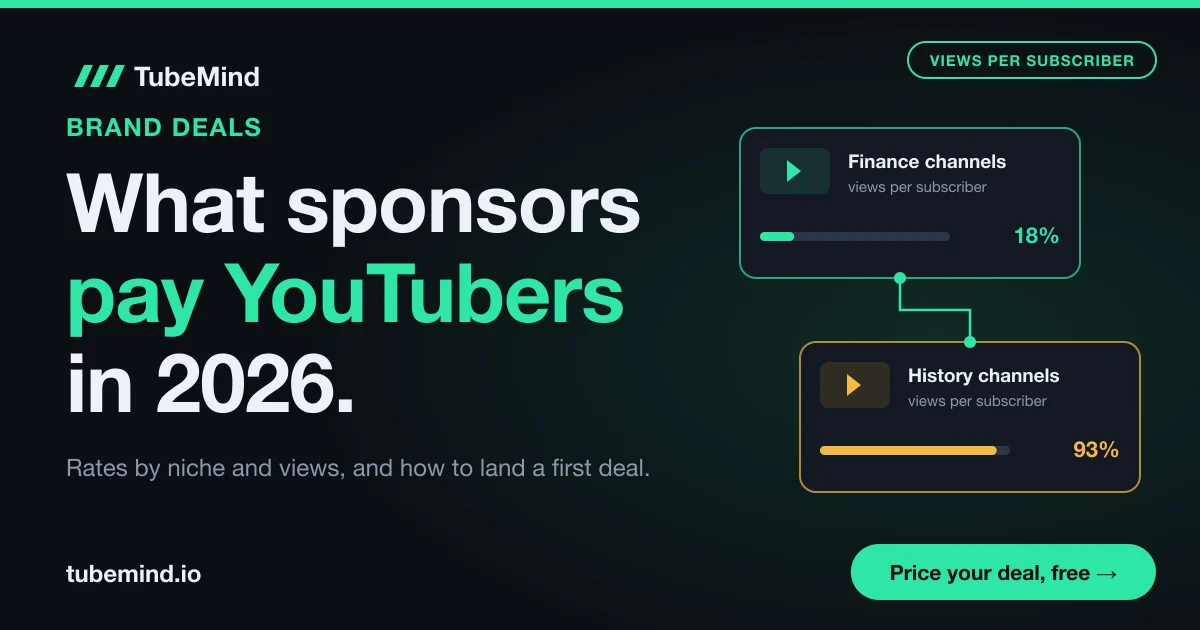
- Sponsors pay for expected views. In TubeMind's index on 3 November 2026, the median Finance & Investing channel averaged views equal to 18% of its subscribers, while the median History Documentary channel averaged 93%.
- YouTube asks you to tick the paid promotion box on every sponsored video, and the FTC says the disclosure must also be in the video itself, said and shown.
- YouTube's Creator Partnerships marketplace was open in 24 countries on 3 November 2026, including India. Pakistan and Bangladesh were not on the list.
- Google found about 15,000 attacker accounts sending fake sponsorship offers to YouTubers in 2021, so never run a file that a "sponsor" sends you.
The first sponsor email feels like proof that your channel has made it. Then the brand asks "what is your rate?", and you have no idea if $100 is too much or $1,000 is too little. Every guide you find shows a different table.
I have been on YouTube since 2018 and blogging since 2010. Here I put the published 2026 numbers side by side, show why they disagree, and add what none of those guides have: TubeMind data on views per subscriber in 39 niches. Then I walk you through your first deal, from the pitch to disclosure and payment. If you only need a price for one brand email today, the sponsorship rate calculator reads your channel and prices every format in a minute.
How much do YouTubers get paid for sponsorships in 2026?
A small creator usually earns a few hundred dollars per sponsored video, a mid-size creator a few thousand, and creators with a million or more subscribers anywhere from about $10,000 to six figures. Those are the ranges that the most visible 2026 rate guides publish. Here they are side by side, so you can see where they agree and where they do not.
| Channel size (subscribers) | 1of10 (Aug 2026) | OutlierKit (Sep 2026) | Influencer Marketing Hub (Aug 2026) | Argil (May 2026) |
|---|---|---|---|---|
| Nano, 1K to 10K | $50 to $500 | $50 to $250 | $20 to $200+ | Not given |
| Micro, 10K to 100K | $200 to $1,500 | $200 to $1,500 | $200 to $1,000+ | $200 to $2,000 (10K to 50K) |
| Mid, 100K to 500K | $1,000 to $10,000 | $1,500 to $10,000 | $1,000 to $10,000+ | $1,000 to $10,000 (50K to 250K) |
| Large, 500K to 1M | $5,000 to $20,000 | $5,000 to $25,000 | $10,000 to $20,000+ | $5,000 to $50,000 (250K to 1M) |
| 1M and above | $10,000 to $100,000+ | $15,000+ | $20,000 to $50,000+ | $25,000 to $250,000+ |
Each number is the price of one sponsored video or one integration, as the guide states it, checked on 3 November 2026. The tier names and cut-off points differ a little between guides (Argil uses its own bands, shown in brackets), so treat each row as a rough match.
Here is how to read it. The micro row is the one to trust most, because all four guides land in the same place: around $200 at the low end and $1,000 to $2,000 at the top. The top row is the one to trust least. For a channel with over a million subscribers, OutlierKit says "$15,000 and up" while Argil goes up to $250,000. That is the same kind of channel with a tenfold gap between two published answers.
Say you have 40,000 subscribers. The table tells you to expect $200 to $1,500 for one sponsored video. Where you land inside that range depends on how many views your videos usually get, what your niche sells, and where your viewers live. The rest of this guide explains each one.
Most brands do not think in subscribers at all. They think in cost per 1,000 views, the same way they buy ads, and the guides publish that number too.
| Source (date checked 3 Nov 2026) | Price per 1,000 expected views | What it is based on |
|---|---|---|
| 1of10 | $10 to $50 | Publicly reported creator rates |
| OutlierKit | $15 to $80, by niche | Its own planning estimates |
| Influencer Marketing Hub | $15 to $30 | Unnamed industry analyses |
| ADOPTER Media | $10 to $100, higher for small channels | Its own agency estimates, with a $1,000 minimum |
| Creators Agency | $50 to $200 | 4,000+ deals it handled, mostly US finance and business |
The price per 1,000 views is often called the sponsorship CPM. It works like this: the brand guesses how many people will see your video, divides that by 1,000, and multiplies by the CPM. If your video is expected to reach 30,000 people and the brand pays a $20 CPM, the fee is 30 × $20 = $600.
Two rows stand out. Creators Agency's $50 to $200 is high because its deals are mostly US finance and business channels, where one customer can be worth hundreds of dollars. ADOPTER Media's high end comes from small channels: when a brand's minimum deal is about $1,000, a video with 5,000 views ends up with a high CPM.
Why the published rate tables disagree so much
They disagree because no one has the full picture. YouTube does not set sponsorship prices, and brands and creators rarely publish their contracts.
- No official price list. Even on YouTube's own Creator Partnerships marketplace, you negotiate and sign with the brand, and the brand pays you directly. YouTube says the amounts shown in an inquiry come from the advertiser and are not final offers (YouTube Help: Creator Partnerships, checked 3 November 2026).
- Self-selected samples. An agency's numbers describe the deals that agency closed.
- A US audience is assumed. If most of your viewers are in Pakistan, India or Bangladesh, the same views are worth less to most international brands.
- Subscriber tiers mix very different channels. A 200K channel with 10,000 views a video and one with 150,000 sit in the same row.
- Most of these pages sell a tool, an agency service or a marketplace, which is a reason to compare several.
My advice: use the tables as a sanity check, never as your price. If your quote lands far outside every range for your size, check your numbers again.
What our data shows: subscribers are a weak guide to sponsor pay
A subscriber count tells a brand very little about how many people will see its segment, and our index shows how much that gap changes from niche to niche. On 3 November 2026, TubeMind tracked 21,452 channels and 1,785,460 videos. For each of 39 niches, we take every channel's average views per video divided by its subscribers, then use the median channel. Here are 13 of those niches.
| Niche | Channels tracked | Median views per video as a share of subscribers | Typical views per video on a 100K subscriber channel |
|---|---|---|---|
| Crypto | 339 | 10% | about 10,000 |
| Kids Learning | 840 | 17% | about 17,000 |
| Finance & Investing | 370 | 18% | about 18,000 |
| Make Money Online | 298 | 20% | about 20,000 |
| Gaming Guides | 361 | 33% | about 33,000 |
| Health & Wellness | 350 | 40% | about 40,000 |
| AI Tools & News | 321 | 45% | about 45,000 |
| Tech Explained | 248 | 53% | about 53,000 |
| Cricket Analysis | 410 | 62% | about 62,000 |
| Cooking & Recipes | 515 | 93% | about 93,000 |
| History Documentary | 395 | 93% | about 93,000 |
| Urdu Facts & Stories | 216 | 100% | about 100,000 |
| Geography & Maps | 209 | 281% | about 281,000 |
Read the third column like this: in Finance & Investing, the middle channel averages views per video equal to 18% of its subscriber count. So a typical finance channel with 100,000 subscribers gets about 18,000 views per video. A typical history channel of the same size gets about 93,000. Geography goes past 100% because maps and explainer videos travel far beyond the people who subscribed.
Now see what that does to sponsor pay. Both channels sit in the same "100K to 500K" row of every rate table. But take a hypothetical finance sponsor paying a $40 CPM: 18,000 views gives a fee of about $720. A hypothetical history sponsor at a $15 CPM gets 93,000 views, which comes to about $1,395. The finance channel has the richer niche and still earns less per video, because brands pay for the views they expect.
This is why I tell creators to price on median views of recent long videos. The median is the middle video when you line them up, so one viral hit does not inflate it. Brands check your last ten uploads anyway, and a number that matches what they see makes the talk easier.
Views per subscriber here is each channel's average views per tracked video divided by its subscribers, with the median channel shown; channel counts are what our index holds. Method in how our scores work.
What makes one creator earn more than another
Six things move a sponsorship price, and views per video matter most. The rate calculator page shows the exact math, so here I only explain why brands care about each one.
- Views per video. More expected views means a bigger fee, almost in a straight line.
- Niche. A brand pays more where one customer is worth more. Finance, software and AI tools sit at the top of most guides; gaming and entertainment sit lower. Our RPM by niche table shows the same order for ad pay.
- Audience country. Many sponsors sell to US, UK, Canadian and Australian buyers. If 70% of your viewers are in Pakistan, a US brand gets fewer customers from the same views and pays less. Apps and online services that anyone can buy are less strict. Our guide to YouTube RPM in Pakistan explains the same gap in ad pay.
- Format. A 30-second mention costs less than a 60 to 90 second integration, and a whole video about the product costs the most. A Shorts mention sits at the bottom.
- Engagement and trust. Comments full of "I bought this because of you" are worth more than silent viewers. Check yours with the engagement rate calculator before you pitch.
- Extra rights. Reusing your clip in the brand's ads, or keeping you away from its competitors, are separate charges on top of the base fee.
A quick test before saying yes: compare the offer with what ads would pay for the same video. Say your video gets 20,000 views and your ad RPM is $3. Ads pay about $60. A $300 sponsor pays five times that, so it is worth the 60 seconds. A $40 offer is not, because the segment may also cost you watch time. Our guide to how much YouTube pays per view helps you work out your ad side.
Can small channels get sponsored?
Yes. YouTube has no subscriber minimum for paid promotions, and you do not need to be in the YouTube Partner Program to sign a deal directly with a brand. The YouTube Partner Program only matters for YouTube's own marketplace, Creator Partnerships, which requires it.
What changes for a small channel is the kind of deal you get. Early offers usually look like one of these:
- Free product deals. No cash, but it still counts as a sponsorship for disclosure.
- Affiliate deals: a link and a commission on each sale. The easiest first "yes" for a brand, because it pays only for results.
- Small flat fees, often from apps and startups testing creators cheaply.
- Flat fee plus commission: a lower fixed price and a share of sales.
A small channel in a narrow niche can beat a big general one. A microphone brand would rather reach 5,000 podcasters than 50,000 random viewers. My rule of thumb, and only my opinion: start pitching when your last 10 long videos have a steady median, even at 2,000 to 5,000 views.
How to land your first sponsorship, step by step
Your first deal is mostly preparation: know your numbers, pick brands that fit, and send a short pitch. Here is the order I would follow.
- Pull your numbers from YouTube Studio. Write down the views of your last 10 to 15 long videos once each is 30 days old, then find the middle one. Also note average view duration, top 3 countries and main age group. Since 24 August 2026, YouTube counts a public view the moment a video starts to play, while earnings still use engaged views (YouTube Help on how views are counted, checked 3 November 2026), so careful brands may ask for Studio screenshots. If a brand questions your numbers, our post on how to check if YouTube views are fake shows what they look for.
- Make a one-page media kit: channel link, one line on what you make and for whom, median views, average view duration, top countries, age range, two sample videos, past sponsors and your email.
- List 20 brands that fit. Start with products you already use on camera. Then find channels like yours (the similar channels finder helps) and read their descriptions: the "sponsored by" lines show which brands already pay creators in your niche.
- Find the right person: an influencer, partnerships or creator marketing manager, on the brand's website or LinkedIn. Many software companies have a "creators" page with a form.
- Send a short pitch, under 150 words. A template is below.
- Follow up once after 5 to 7 days with one new line, then move on. Silence is common.
- Quote with a reason. Give one number based on your median views. The sponsorship calculator gives a floor, an asking price and a premium for each format.
- Get it in writing before you film (see the contract section).
- Deliver, then report. Send a short results note at 7 and 30 days: views, clicks if you have them, and two or three viewer comments about the product. This step gets you the second deal.
Here is a pitch template. The channel and numbers are hypothetical, so swap in your own.
Subject: [Your channel] x [Brand]: video for [audience] in [month]
Hi [Name],
I run [channel], a [niche] channel for [who watches]. My long videos get a median of [12,000] views in their first 30 days, and [55%] of viewers are in [US, UK and Canada].
I already use [product] for [task], and I think a 60-second segment in my next video on [topic] would fit naturally. Here are two recent videos: [link], [link].
My media kit is attached as a link, and I can send Studio screenshots. Would you be open to a short call or a brief?
Thanks,
[Name]
Why this works: it names the person, shows you know the product, gives one number the brand can check, and ends with a small ask. It also leaves out a long channel story, a price and any attachments.
Where sponsors find creators, and which route suits you
There are five common routes to a sponsor, and most creators use two or three at once.
| Route | How it works | Best for | Watch out for |
|---|---|---|---|
| Brands email you | A brand finds your channel and writes to the email on your About page | Channels with steady views in a clear niche | Fake offers; check the sender's domain |
| You pitch brands | You email brands that fit, as in the steps above | Small channels and first deals | Low reply rates; send to a named person |
| YouTube Creator Partnerships | Brands send inquiries through YouTube Studio, Earn tab | YPP creators in the 24 supported countries | Not available in Pakistan or Bangladesh |
| Agencies and managers | A person negotiates for you and takes a share | Channels getting more offers than they can handle | Read how much they keep and for how long |
| Affiliate and creator programs | You join a brand's program and earn per sale | Any size; a good first step | Income depends fully on sales |
Under 50,000 subscribers, I would pitch brands directly and join two or three affiliate programs for products you already use. Agencies rarely take channels that small.
For creators in Pakistan: YouTube's Creator Partnerships page listed 24 supported countries on 3 November 2026, including India, Saudi Arabia, the UAE, the UK and the US, but not Pakistan or Bangladesh (YouTube Help: Creator Partnerships). Your deals will come from pitches, inbound emails and agencies, and they can still pay well, especially if part of your audience is abroad.
Disclosure rules: YouTube's paid promotion box and the FTC
Disclose every paid deal twice: with YouTube's paid promotion setting, and in your own words in the video. Free products count too.
What YouTube asks you to do
If your video includes branded content, sponsorships, endorsements or another commercial relationship, YouTube asks you to tell it. When you upload, open the video details, click Show more, and under Paid promotion choose "Yes, my video includes branded content". For a video already live, open it from the Content page in YouTube Studio and tick the same box. YouTube then shows a disclosure label at the beginning of the video. Branded content must also follow YouTube's Community Guidelines and Google Ads policies, and YouTube says you and the brand share responsibility for following the law where you live (YouTube Help: paid product placements and endorsements, checked 3 November 2026).
What the FTC says in the US
The US Federal Trade Commission's guide for influencers is clear on a few points (FTC: Disclosures 101 for Social Media Influencers, checked 3 November 2026):
- Disclose any financial, employment, personal or family tie to a brand. A free or discounted product counts, not just money.
- Put the disclosure in the video itself, not only in the description. Say it and show it on screen, because some people watch without sound.
- Put it where people will not miss it. A disclosure at the end of the video, behind a "more" link or buried in hashtags is easy to miss.
- Use plain words such as "ad", "advertisement" or "sponsored", or "thanks to [brand] for the free product". Vague tags like "sp" or "collab" are not enough.
- Do not rely only on the platform's tool. The FTC says to use it, and to add your own disclosure as well.
The FTC's question and answer page adds two details for YouTube. For a paid segment in the middle of a video, disclose right before or at the start of that segment. And if you live outside the US but your videos will foreseeably reach US viewers, US law applies to you too (FTC: Endorsement Guides, what people are asking). It also says "paid link" next to an affiliate link is clear, while "commissionable link" probably is not.
In practice, a line like "This part of the video is sponsored by [brand]" at the start of the segment, with "Sponsored" on screen, plus the paid promotion box, covers both pages.
If you live outside the US
The FTC notes that other countries, including the UK, have similar rules, and YouTube's page points creators to local regulators. Check the rules where you and most of your viewers live, and disclose in the language of the video.
Contracts, payment and tax for your first deal
A written agreement protects both sides, even for a $100 deal. An email thread confirming the terms is the minimum. Make sure it covers:
- Deliverables: format, segment length, topic and links.
- Dates: brief, draft and publish.
- Approval: rounds of changes included (one is common).
- Usage and exclusivity: what the brand can reuse, which competitors you avoid, and for how long.
- Payment: amount, currency, method and due date.
- Cancellation: what you get if the brand pulls out after you film.
On payment, a split I would ask for on a first deal is half when you sign and half when the video goes live. Many brands pay invoices 30 days after they receive them (often written as "net 30"), so send your invoice the day the video is published.
If you are in Pakistan or India and the brand is abroad, ask early which payment methods it supports, and price in dollars so currency moves do not shrink your fee. Keep every invoice and payment record, because sponsorship income is taxable income in most countries. I cannot give tax advice for your situation, but the take-home calculator lets you subtract your own tax rate and fees to see what you keep. Once sponsors become regular, the income mix calculator shows if one brand has become too big a share of your income.
How to spot a fake sponsorship email
Fake sponsor offers are a common way channels get hacked, so treat any offer that asks you to install something as a warning sign.
In October 2021, Google's Threat Analysis Group reported fake sponsorship offers sent to YouTube creators, posing as known companies selling VPNs, antivirus tools or games. The "software" stole browser cookies and passwords, and the attackers took over the channels. Google identified about 15,000 attacker accounts and at least 1,011 domains made only to deliver the malware (Google TAG, October 2021). The report is old, but the same trick still lands in creators' inboxes.
Red flags I check in every offer:
- The sender uses a free email address or a domain that is one letter off from the brand's.
- They want you to download and run software, a "contract" file, or a password-protected zip.
- The fee is far above every range in the tables above, with no questions about your audience.
- They push you to act today.
- They ask you to log in to anything through a link they sent.
When in doubt, find the brand's official website yourself and confirm the offer with its partnerships team. Turn on 2-Step Verification for your Google account.
Mistakes to avoid, and the limits of these numbers
Most first deals go wrong in the same few ways:
- Quoting from your best video. The brand checks your last ten uploads, sees a lower number, and cuts the offer.
- Pricing on subscribers. Two channels of the same size can get five times different views.
- Accepting the first counter offer with no minimum price in mind.
- Forgetting disclosure on free product deals.
- Promoting something you would not use. One bad product can cost trust that took years to build.
And the limits. Every rate range here is an estimate from a company with its own view of the market, and none is official. The ranges lean on US audiences and say little about Urdu, Hindi or Bangla audiences, where public data is thin. TubeMind's views per subscriber numbers cover the channels in our index (about 21,000 on 3 November 2026) and will shift as it grows. Use them as a starting point, then let the offers you receive teach you your own market.
Sources and method
Method and sources. Rate ranges were read from six public 2026 guides on 3 November 2026: 1of10 (updated 24 August 2026), OutlierKit (updated 13 September 2026), Influencer Marketing Hub (updated 31 August 2026), Argil (10 May 2026), ADOPTER Media (updated 13 July 2026) and Creators Agency (reviewed 17 July 2026). None publishes its full underlying data. TubeMind figures: index stats and niche data on 3 November 2026 (21,452 channels, 1,785,460 videos, 39 niches). Official pages checked the same day: YouTube Help on paid promotion, Creator Partnerships and view counting; the FTC's Disclosures 101 and Endorsement Guides FAQ. Security figures: Google Threat Analysis Group, October 2021.
Got a brand email in your inbox? Price it with the free sponsorship rate calculator, built on your channel's median views.
Research right on YouTube: the free TubeMind Chrome extension shows the outlier multiplier, a revenue estimate and similar channels on YouTube pages.
Frequently asked questions
How many subscribers do you need to get a sponsor on YouTube?
There is no minimum. YouTube sets no subscriber limit for paid promotions, and brands care more about steady views in a clear niche. Channels with 1,000 to 10,000 subscribers do get offers, mostly free products, affiliate links or small fees. A steady median of even 2,000 to 5,000 views a video is enough to start pitching small brands.
How much does a YouTuber with 1 million subscribers get for a sponsorship?
Published 2026 guides put it anywhere from about $10,000 to over $100,000 per sponsored video, and one goes as high as $250,000. The gap is that wide because a million subscribers can mean 30,000 views a video or 1 million. The fee follows the views a video usually gets and the niche, so two channels of that size can earn very different amounts.
Can I get sponsored on YouTube without being monetized?
Yes. You can sign a deal directly with a brand without being in the YouTube Partner Program. You still have to tick the paid promotion box and disclose in the video. Only YouTube's own Creator Partnerships marketplace requires YPP membership, at least 18 years of age, a supported country and no active Community Guidelines strikes.
How do YouTubers find sponsors?
Most use a mix of five routes: brands that email them, pitching brands themselves, YouTube's Creator Partnerships in Studio, agencies or managers, and affiliate programs. For a first deal, pitching works best. Read the descriptions of channels like yours to see which brands already sponsor your niche, then email a named partnerships manager with your median views and audience countries.
What should a YouTube media kit include?
Keep it to one page: channel name and link, one line on what you make and for whom, median views of recent long videos, average view duration, top three countries, main age group, two or three sample videos, past sponsors and your email. Use numbers a brand can check against your channel, and have YouTube Studio screenshots ready if they ask.
Do sponsors pay before or after the video goes live?
It depends on the brand and your agreement. Many brands pay an invoice 30 days after receiving it, often written as net 30. On a first deal, ask for half when you sign and half when the video goes live, and send your invoice the day it is published. Write the amount, currency, method and due date in the agreement.
If a brand only sends me a free product, do I have to disclose it?
Yes. The US FTC says a free or discounted product is a material connection, just like money, and it should be disclosed in the video itself, said and shown. Tick YouTube's paid promotion box too. A simple line such as "Thanks to [brand] for sending me this for free" at the start of the review works.
How can I tell if a sponsorship email is a scam?
Be careful if the sender uses a free email address or a lookalike domain, asks you to download software or a password-protected file, offers far above normal rates without asking about your audience, or pushes you to act today. Google reported about 15,000 attacker accounts sending fake sponsor offers to creators in 2021. Confirm the offer through the brand's official website.
Do Pakistani YouTubers get international sponsors?
Yes, but mostly through direct pitches, inbound emails and agencies, because YouTube's Creator Partnerships marketplace did not include Pakistan on 3 November 2026. Fees usually depend on where the viewers live, so a channel with part of its audience in the US, UK or Gulf countries can earn more. Price in dollars and confirm the payment method early.