In this guide
Key takeaways
- YouTube's spam policy bans "maliciously misleading" titles, and since December 2024 YouTube removes egregious clickbait, starting in India.
- YouTube's own A/B test picks the winning title by watch time, so a title that wins clicks and then loses viewers loses the test.
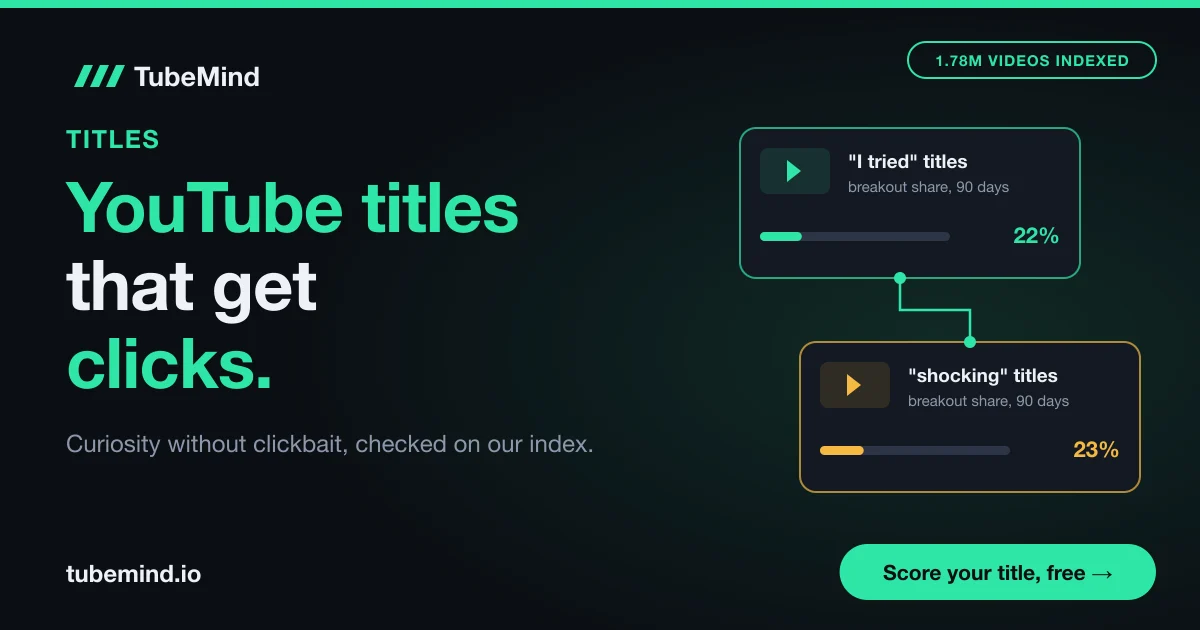
- In TubeMind's index on 3 November 2026, 23% of recent videos with "shocking" in the title broke out, the same as "vs" and below "mistakes" (24%).
- Half of all channels and videos on YouTube have an impressions click-through rate between 2% and 10%, according to YouTube Help.
- The promise test: is it true, is it shown in the video, and would the viewer feel tricked at the end?
You finished the edit, and now every title you type feels either boring or fake. "My trip to Hunza" sounds like a diary entry. "You WON'T BELIEVE what happened in Hunza" sounds like spam.
I have been on YouTube since 2018 and blogging since 2010, and the title is still the part I rewrite most. There is a wide space between dull and dishonest, and this guide shows you how to find it every time. If you want ideas fast, our free YouTube title generator gives you drafts in seconds, and the title analyzer checks one you already wrote. This page is about the thinking behind a good title, so you can judge any draft yourself.
What makes a YouTube title get clicks
A YouTube title gets clicks when it does two jobs at once: it tells the right viewer what they will get, and it gives them one reason to pick this video over the others on the screen.
On the home page your title sits next to 10 or 20 others. The viewer glances and asks two quiet questions: "Is this for me?" and "Why this one, now?" Answer only the first and the title is easy to skip. Answer only the second and it is confusing. You need both.
Here is a simple example. Say your video shows how you fixed the echo in a small bedroom using blankets, a $20 microphone and three settings in a free app.
- Too plain: "My audio setup". It does not say what problem it solves.
- Clickbait: "This $20 trick makes you sound like a radio host". Unless it does, viewers leave angry.
- Clear and clickable: "Fix room echo for $20: blankets, a cheap mic and 3 settings". The viewer with echo knows this is for them, and the price and the "3 settings" give them a reason to click.
The good version has a number, a price and a promise, and every word is true. YouTube's own thumbnail and title tips say the same thing in fewer words: be accurate, be short, put the important words first, use ALL CAPS and emoji sparingly, and choose between a searchable and an intriguing title. More on that last point below.
The title generator page covers character limits and mobile cut-off. The short version: YouTube allows 100 characters, and the end of a long title often gets cut off.
Where curiosity ends and clickbait starts
Curiosity hides how something happened; clickbait lies about what happened. That one sentence settles most arguments about titles.
"Why airplane windows are round" makes you curious, and the video explains it. A clickbait title promises something the video never delivers, and the viewer clicks, waits and finds nothing.
YouTube draws the line in its spam, deceptive practices and scams policy. It bans using "maliciously misleading titles, thumbnails, descriptions, or imagery to trick users into clicking". Its example is a title that offers a full sports match when the video only shows a clip. On 18 December 2024, Google announced stronger enforcement against egregious clickbait, starting in India. It defined egregious clickbait as a title or thumbnail that promises what the video does not deliver, especially in news, such as "the president resigned!" on a video with no resignation. At first such videos are removed without a strike. I checked both pages on 3 November 2026.
So the rule is "never promise what you do not show". I check every title with three questions, the promise test.
- Is it true? Every claim in the title, including numbers, prices and words like "best", "banned" or "free", must be literally true for this video.
- Is it shown? The thing the title promises must appear in the video itself. A comment, a part two or a "maybe next time" does not count.
- Would the viewer feel tricked at the end? Picture someone who clicked because of the title and watched to the end. If they would say "that was not what I came for", the title fails.
Here is how the same idea looks on both sides of the line.
| What the title does | Curiosity (fair) | Clickbait (unfair) |
|---|---|---|
| Holds back an answer | Says the answer is in the video, then gives it | Hints at an answer the video never gives |
| Uses emotion | Matches the feeling in the video | Adds shock the video does not have |
| Uses a number | The number is in the video and correct | The number is rounded up, made up or from someone else |
| Names a person or brand | That person or brand is a main part of the video | They appear for five seconds or not at all |
| Says "news" or "breaking" | The video covers that news with facts | The video is opinion or old news under a new headline |
Every tool on the left side is also on the right side. Curiosity, emotion, numbers and names are all fine. What changes is whether the video backs them up. For example, "I tested 5 power banks for 30 days" is fine if you did. The same title with three power banks and one week of testing is clickbait, even though the words are almost the same.
Why clickbait loses even when it wins the click
Clickbait loses because YouTube does not judge a title by clicks alone. It judges what happens after the click.
YouTube has explained this publicly. In a September 2021 post on YouTube's recommendation system, Cristos Goodrow, YouTube's VP of Engineering, wrote that a click is a useful but imperfect signal. In 2012 YouTube added watch time to its signals, and later it added satisfaction surveys, where only videos rated four or five stars count as "valued watchtime".
YouTube's title test follows the same logic. In the A/B test for titles and thumbnails, you can test up to 3 titles, and the winner is the one with the most watch time. Click-through rate does not pick the winner.
Here is a hypothetical example to make the maths clear. Say two titles each get 1,000 impressions.
| Title | Click-through rate | Viewers | Average watch | Total watch time |
|---|---|---|---|---|
| A: big promise, weak delivery | 10% | 100 | 1.5 minutes | 150 minutes |
| B: clear promise, kept | 6% | 60 | 5 minutes | 300 minutes |
Title A got 100 clicks against 60, but viewers left after a minute and a half. Title B's viewers stayed five minutes, so B produced twice the watch time and wins YouTube's test. The numbers are made up; the logic is how YouTube says its system works.
There is a slower cost too. A viewer who feels tricked remembers your channel and skips it next time.
What about a "good" click-through rate? YouTube Help says half of all channels and videos have an impressions click-through rate between 2% and 10% (YouTube Help, Impressions and click-through rate FAQs, checked 3 November 2026). So do not panic if yours is 4%. Look at click-through rate and average view duration together, which I explain in the step by step section below.
Eight title patterns that earn the click fairly
Most titles that get clicks fairly use one of eight patterns, and each one has a clear point where it turns into clickbait.
Each pattern answers "why click this one?" in a different way. Here they are with a fair example and the line you should not cross.
| Pattern | Fair example | It becomes clickbait when |
|---|---|---|
| Specific result | I grew tomatoes on my balcony in 60 days for $5 | The result is staged, rounded up or not shown |
| Question the video answers | Is a $300 laptop enough for video editing? | The video never gives a clear yes or no |
| Contrast or "vs" | Free vs paid mic: can viewers hear the difference? | Only one side is tested fairly |
| Mistake or warning | 5 meal prep mistakes that spoil food by Wednesday | It scares people and gives no fix |
| Experiment | I posted a Short every day for 30 days | You stopped at day 12 |
| Number list | 7 free apps I use to edit on my phone | The number is padded with weak items |
| Method with a limit | How to film at home without a ring light | You use a ring light halfway through |
| Surprising fact | Why airplane windows are round | The "why" is never explained |
Look at the right-hand column. In every row, the problem is the same: the video does not back up the title. None of these patterns is unfair by itself.
The way to use this table is backwards from how most people use it. Do not pick a pattern and then bend the video to fit. Watch your video first and ask: what is the strongest true thing in it? If the strongest thing is a number ("I saved 40 hours"), use the result pattern. If it is a clear answer to a common doubt, use the question pattern. If you compared two things, use contrast. The video tells you which pattern to use.
Two habits help with every pattern. Use the words your viewers use: people search "laptop for editing" more than "editing workstation". And add one concrete detail, such as a price, a number of days or a place. "How to save money" is a topic. "How I saved Rs 15,000 a month on groceries" (a hypothetical) is a promise.
If you want these patterns filled in with your own topic, the title generator does it in a few seconds. Then run the drafts through the promise test above before you keep any.
What our data shows: hype words do not beat plain ones
In TubeMind's index, titles with the word "shocking" broke out no more often than titles with plain words like "vs" or "mistakes".
Many creators believe loud words win clicks. To check, on 3 November 2026 I looked up five common title words in TubeMind's keyword data, which covers indexed videos from the last 90 days with the word in the title. That day the index held 1,785,955 videos from 21,466 channels.
| Word in the title | Uploads (90 days) | Channels | Median views | Breakout share |
|---|---|---|---|---|
| how to | 14,637 | 3,730 | 4,291 | 18% |
| I tried | 666 | 370 | 22,858 | 22% |
| shocking | 2,058 | 951 | 7,167 | 23% |
| vs | 21,617 | 4,065 | 12,497 | 23% |
| mistakes | 815 | 518 | 9,517 | 24% |
TubeMind keyword data, uploads from the last 90 days, checked 3 November 2026. Breakout share = uploads that got at least 2 times their channel's median views, divided by all uploads with the word.
Here is how to read the last column. Take "shocking": of every 100 recent videos with that word in the title, 23 got at least double the usual views for their channel. A breakout share compares each video with its own channel, so a small channel and a big channel are judged fairly.
The first lesson is that "shocking" did not beat plain words. It sits at 23%, exactly level with "vs" and one point below "mistakes". Its median views, 7,167, are lower than "vs" (12,497) and "mistakes" (9,517). If loud words were a shortcut, this is where you would see it, and it is not there.
The second lesson: "how to" has the lowest breakout share (18%) and median (4,291 views). That does not make how-to titles bad. How-to videos often earn search views for months, which a 90-day window misses, and the phrase is crowded (TubeMind difficulty 97 out of 100). Phrase matches also catch odd cases: the top "how to" upload was a film trailer.
The third lesson: "I tried" had the highest median, 22,858 views. But only 38% of those uploads came from channels under 50,000 subscribers, against 52% for "shocking", so bigger channels explain part of that number.
The most viewed "shocking" video in the sample (42.7 million views, on a channel of 54,500 subscribers) was a Hindi explainer about the depth of the ocean. Its title put the topic first and "SHOCKING" last, in brackets. The topic did the work.
Please read these numbers with care. They show which words appear in titles of videos that did well. They cannot prove that a word caused the views, because the topic, thumbnail and channel matter far more. The full method behind our numbers is on how our scores work.
To study titles that broke out in your own niche, open the outlier finder and look at the titles of videos that beat their channel's usual views. Copy the shape of the promise, never the words.
Search title or browse title: choose by where your views come from
Write a searchable title when people look for your topic, and an intriguing title when YouTube has to show your video to people who were not looking.
This split comes from YouTube itself. Its title tips say searchable titles state clearly what viewers will get, while intriguing titles spark curiosity in viewers who are not searching for the topic. A person typing "how to fix room echo" and a person scrolling after dinner want different things from a title.
| Where the viewer finds you | What they are doing | Title style that fits | Example |
|---|---|---|---|
| YouTube search | Looking for an answer | Their search words first, then the payoff | Room echo fix: 3 cheap ways that work in a bedroom |
| Home page and suggested videos | Browsing, open to ideas | Result, contrast or surprising fact | I spent $20 to make my bedroom sound like a studio |
| Shorts feed | Swiping fast | A short hook, a few words | Blankets vs foam for echo |
The top two rows describe the same video. The search title starts with the words a searcher types. The browse title starts with a story, because the person on the home page has no problem in mind yet. Both are true.
How do you know which one you need? Look at an older video on the same topic in YouTube Studio. Open Analytics, go to the Content tab, and check the traffic source types. If YouTube search brings most of the views, lead with the search words. If browse features and suggested videos lead, write for curiosity. A new channel with no history can check what ranks instead: search the topic on YouTube and read the titles of the top results. Our guide on checking your YouTube video ranking shows how to see where a video ranks for a phrase, and the keyword research tool shows which phrase people use.
Many good titles mix both: the search phrase first, then a curiosity part. "Room echo fix: what $20 can and cannot do" serves the searcher and still gives a reason to click.
Six clickbait titles rewritten
To fix a clickbait title, keep the emotion and swap every vague or false word for a specific true one.
The titles below are hypothetical, and each has a fair version that keeps the energy.
| Clickbait title | What the video shows | Fair rewrite |
|---|---|---|
| YouTube DELETED my channel | One video got age-restricted | One of my videos got age-restricted. Here is why and what I changed |
| I made $10,000 in ONE DAY | $10,000 earned over a year | What my channel earned in 12 months, month by month |
| This phone DESTROYS the iPhone | Only the cameras are compared | $250 phone vs iPhone: 5 camera tests in daylight and at night |
| You won't believe what happened | The car broke down on a desert road | Our car broke down in the desert at night. This is what we did |
| Full match highlights | The last 40 seconds of the match | Final 40 seconds: the winning goal and the crowd's reaction |
| Big monetization change (BAD NEWS) | A small update to one form | YouTube changed one AdSense form: who needs to update it |
The age-restriction title is still dramatic, but it no longer claims a deleted channel. The earnings title loses the fake "one day" and gains a month by month breakdown, which is more useful anyway. The "full match" title is YouTube's own policy example, so that one could get a video removed as well as skipped.
The "you won't believe" title hides the topic completely. The rewrite keeps the tension (a breakdown, a desert, night) and tells you what the video is about, so you want to see how it ends.
The rewrites also drop the capital words. One capital word to stress a feeling is fine; a shouting title looks like spam next to calm ones.
How I write a title, step by step
The fastest way to a fair title is to decide the promise before you film, then make sure the first minute of the video pays it.
- Write the promise in one sentence before you film. "After this video, the viewer will know how to fix room echo for under $20." If you cannot write it, the video is not ready.
- Mark the proof moment. Find where the video shows what the title promises. If it is at minute 9 of 10, move it up or tease it early.
- Write at least 10 drafts across 4 or more patterns. Use the table of eight patterns above or the title generator. The first idea is rarely the best one.
- Cut to 3 with the promise test. Drop anything untrue, missing from the video or likely to make a viewer feel tricked.
- Put each title next to the thumbnail. The thumbnail and title should tell one story together, each adding something. If the thumbnail says "$20", the title can carry the result. Preview them side by side in the thumbnail tester.
- Check the mechanics. Run your favourite through the title analyzer for length, front-loading and risky words.
- Script the first 30 seconds to pay the promise. The opening should confirm that the viewer is in the right place. The hook generator helps you write an opening that matches the title.
- Test, then read two numbers together. For long videos, put your best 3 titles into YouTube Studio's A/B test. After about a week, compare impressions click-through rate with average view duration.
Click-through rate tells you whether the title and thumbnail won the glance. Average view duration tells you whether the video kept the promise. Read them as a pair:
| Click-through rate | Average view duration | What it usually means | What to do |
|---|---|---|---|
| Low for your channel | Good for your channel | People who click love it; too few click | Rewrite the title and thumbnail |
| High for your channel | Low for your channel | The title promises more than the start delivers | Make the title more exact or fix the opening |
| Low | Low | The topic may not interest this audience | Try a different topic before blaming the title |
| High | High | Title, thumbnail and video match | Make more videos like this one |
"High" and "low" mean compared with your own channel's usual numbers. Say your videos usually get 5% click-through and keep viewers for 4 minutes. A new video at 8% and 1.5 minutes sits in the second row: the title worked too well for what the video gives. That is the clearest sign of a promise gap, and it is the pattern clickbait creates.
Shorts work differently. YouTube's A/B test does not support Shorts, so you pick one title, publish, and judge it by how the Short performs in the feed. Keep Shorts titles short and lead with the hook, since the title sits over the video.
YouTube Outlier Finder
Find videos in your niche that beat their channel's usual views, and study how their titles make a promise without overselling it.
Find breakout videosTitles in Urdu, Hindi and Roman Urdu
For Urdu and Hindi audiences, write the search words in the script your viewers type, and keep the same promise test as in English.
Many viewers in Pakistan and India search in Roman Urdu or Roman Hindi ("paise kaise kamaye"), some in Urdu or Devanagari script, and many mix in English. YouTube's search suggestions show which version your viewers type. The most viewed "mistakes" video in our 3 November sample was a Hindi title that ended with "5 Mistakes" in English and had 1.1 million views on a channel of 54,300 subscribers.
Be extra careful with news and "breaking" titles in South Asia. YouTube's stronger enforcement against egregious clickbait started in India, and its main concern was news and current events. A title like "Bara elan aa gaya" (a hypothetical example) on a video that only repeats old news is exactly the kind of promise the policy targets.
When a good title still does not get clicks
A title cannot rescue a topic people do not want, and it is only half of the package.
- The topic decides first. A great title on a topic few people want still gets a small audience. Check demand before you film with our guide to YouTube outlier videos, which shows how to spot topics that are breaking out now.
- The thumbnail does half the work. A weak image drags down a strong title. Our thumbnail size guide covers the technical side.
- Small numbers are noisy. YouTube Help notes that videos with fewer than 100 views can show a wider click-through range, so on a new channel judge titles across several videos.
- Our data has limits. The word table cannot separate the effect of a word from the topic, channel or thumbnail, and TubeMind's index covers part of YouTube.
- Changing titles has a cost. A video that already gets steady search traffic can lose it if you remove the words people find it with. Change one thing at a time and wait a few weeks.
Sources and method
Title word data is from TubeMind's keyword data on 3 November 2026: indexed videos from the last 90 days with the word in the title, with uploads, channels, median views and breakout share (uploads at 2 times or more of their channel's median views, divided by all uploads). The index held 1,785,955 videos from 21,466 channels that day, fetched through the official YouTube Data API. Small channels are those under 50,000 subscribers. Method in how our scores work. All YouTube pages were checked on 3 November 2026: Thumbnail and title tips, Spam, deceptive practices and scams policy, A/B test titles and thumbnails, Impressions and click-through rate FAQs (support.google.com/youtube/answer/7628154), the YouTube Official Blog post On YouTube's recommendation system (September 2021) and Google India's post on egregious clickbait (18 December 2024). Examples marked hypothetical are illustrations only.
Want to see titles that are winning in your niche right now? Open the outlier finder, free.
Research right on YouTube: the free TubeMind Chrome extension shows the outlier multiplier, a revenue estimate and similar channels on YouTube pages.
Frequently asked questions
What is the difference between clickbait and a curiosity title?
A curiosity title holds back how something happened but tells the truth about what the video contains, and the video then gives the answer. Clickbait promises something the video never shows. "Why airplane windows are round" is curiosity because the video explains it. A title promising a full match on a 40 second clip is clickbait, and it is the exact example YouTube uses in its spam policy.
Can YouTube remove a video because of a clickbait title?
Yes. YouTube's spam, deceptive practices and scams policy bans maliciously misleading titles and thumbnails. In December 2024 YouTube also announced stronger action against egregious clickbait, starting in India, where a title or thumbnail promises something the video does not deliver, especially in news. At first it said it would remove such videos without a strike so creators could adjust.
Does clickbait hurt a channel even if the video stays up?
Usually, yes. YouTube looks at what happens after the click, including watch time and viewer satisfaction surveys, so a title that brings people who leave early sends a weak signal. YouTube's own title A/B test picks the winner by watch time. Viewers who feel tricked also tend to skip your next videos, so clickbait borrows clicks from your future uploads.
Which words make people click on YouTube titles?
No single word does it on its own. In TubeMind's data on 3 November 2026, recent videos with "shocking" in the title broke out at 23%, the same as "vs" and slightly below "mistakes" at 24%. Concrete details do more: a price, a number of days, a clear result or a question the video answers. The topic and thumbnail matter more than any one word.
Should my title be searchable or intriguing?
It depends on where your viewers find you. YouTube's own tips say searchable titles state clearly what viewers will get, while intriguing titles spark curiosity in people who are not searching. If YouTube search brings most of your views in Studio's traffic sources, lead with the search words. If browse and suggested videos lead, write for curiosity. Many titles mix both.
How many title ideas should I write for one video?
Write at least 10 drafts using four or more different patterns, such as a result, a question, a contrast and a list. Then cut to three with the promise test: is it true, is it shown in the video, and would a viewer feel tricked at the end? Three is also the number of titles YouTube Studio lets you test at once on a long video.
Should I write the title before or after making the video?
Write the promise before you film, then polish the exact words after the edit. Deciding the promise first keeps the video focused and makes sure the proof appears early, where viewers expect it. After editing, check that every word in the title is still true, because videos often change during the edit and an old working title can end up overpromising.
What is a good click-through rate for a YouTube title?
YouTube Help says half of all channels and videos have an impressions click-through rate between 2% and 10%, and new videos with few views can vary more. Compare each video with your own channel's usual rate instead of other channels. Always read click-through rate together with average view duration, because a high rate with short viewing often means the title promised too much.
How do I know if the title or the thumbnail is the problem?
You cannot fully separate them, because viewers judge the two together. The cleanest way is YouTube Studio's A/B test: test titles only while keeping the thumbnail the same, then the reverse on another video. If a video has a low click-through rate but good average view duration, the package (title and thumbnail) is the weak part, and the video itself is fine.
Are question titles good for YouTube?
They work well when the video gives a clear answer, such as "Is a $300 laptop enough for video editing?" followed by a yes or no with reasons. They turn into clickbait when the video never answers, or answers only "it depends" with nothing more. Put the topic words early in the question so the viewer knows what it is about at a glance.