In this guide
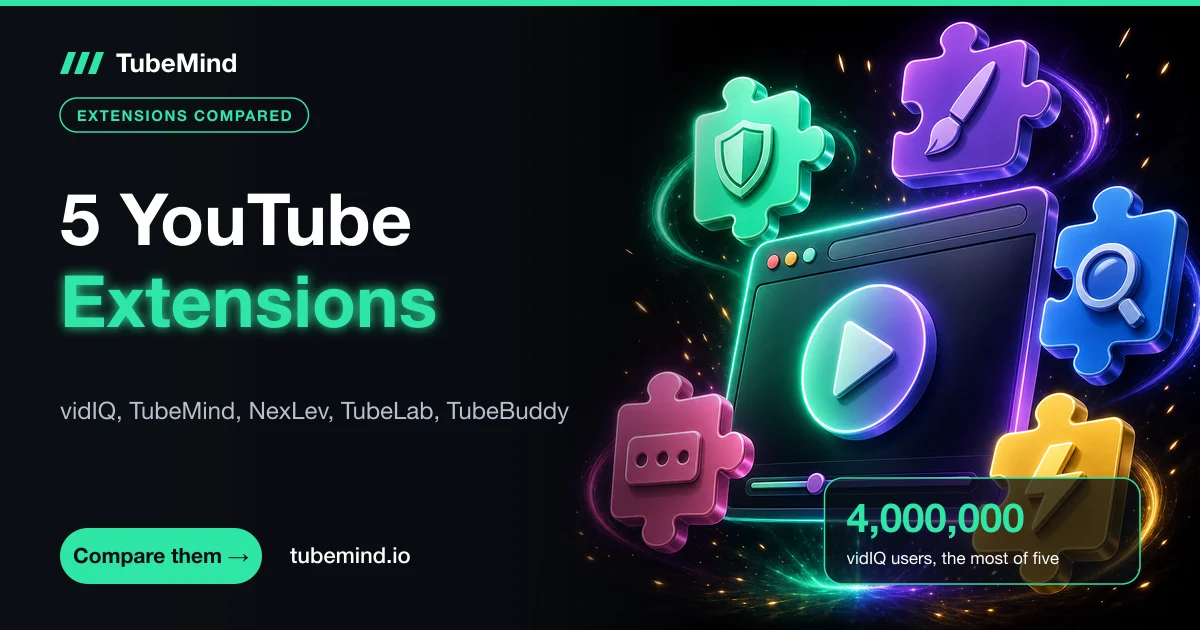
Short answer: the five extensions do different jobs inside YouTube. vidIQ scores videos and keywords, TubeBuddy works inside YouTube Studio, NexLev and TubeMind flag outliers and similar channels while you browse, and TubeLab estimates RPM and earnings. On 16 November 2026, vidIQ had the most Chrome users (4,000,000) and TubeMind the fewest (1,000, newly released).
Key takeaways
- According to the Chrome Web Store on 16 November 2026, vidIQ had 4,000,000 users and a 4.8 rating, TubeBuddy 1,000,000 users and 3.5, NexLev 100,000 and 4.0, TubeLab 20,000 and 4.1, and TubeMind 1,000 and 5.0 from 3 ratings.
- In my 16 November test with one video, channel, Short and search, vidIQ, NexLev and TubeMind added something on every page type, while TubeBuddy added nothing to the channel page or the Short beyond a menu link.
- TubeBuddy's listing says its 50+ tools are accessible within YouTube Studio, which is where its bulk edits and A/B tests live.
- TubeLab's store page says the developer will not collect or use your data; vidIQ's lists personal, authentication and user activity data.
- TubeMind's extension is 172 KiB and asks Chrome for two permissions (storage and clipboard) plus access to YouTube and its own site, with research off until you turn it on.
I have been on YouTube since 2018, and for most of that time a YouTube extension has been the first thing a new creator installs. The question has changed, though. It used to be "vidIQ or TubeBuddy". Now there are research extensions that show you outlier videos, similar channels and earnings estimates on every page, and they are built for a different job.
This guide compares only the extensions: what each one adds to the YouTube page, what is free, and what data each says it collects. Every feature here comes from the extension's Chrome Web Store listing or its maker's own guide, read on 16 November 2026. For full product and price comparisons, I link to my separate guides instead of repeating them. One of the five, TubeMind, is the tool I build, so I describe it from its own code and listing and point out what it lacks.
How I tested the five extensions
On 16 November 2026 I opened the same pages with each extension switched on by itself, in the browser I use for research. I used one test video and one test channel for all of them: a faceless US personal finance channel started in July 2025 with about 7,500 subscribers, its long video about paying off a mortgage at 55, one of its Shorts, and a YouTube search for "pay off mortgage early".
- Everything was read only. I made no purchases, started no trials and changed nothing on any account.
- Where a feature needs a paid plan I could not open, I say so and show the store listing or the maker's own guide instead.
- NexLev was installed from the Chrome Web Store for this test, on its free version, without starting the pro trial.
- TubeMind was tested on version 1.6.14, the same code as the store release, loaded as a local test copy.
- I blurred the test channel's name, artwork, thumbnails and titles in every screenshot, and cropped out my own account details. The tools' estimates for this channel are shown only to illustrate the features, not as facts about the channel.
The five extensions at a glance
Here are the public numbers from each Chrome Web Store page on 16 November 2026.
| Extension | Users | Rating | Ratings | Version | Last updated | Size |
|---|---|---|---|---|---|---|
| vidIQ Vision for YouTube | 4,000,000 | 4.8 | 11.5K | 3.242.0 | 14 Nov 2026 | 17.07 MiB |
| TubeBuddy for YouTube | 1,000,000 | 3.5 | 8.5K | 2271 | 6 Nov 2026 | 41.61 MiB |
| Nexlev YouTube Research and Analytics | 100,000 | 4.0 | 158 | 3.13.3 | 16 Nov 2026 | 3.24 MiB |
| YouTube Monetization and RPM Checker by TubeLab | 20,000 | 4.1 | 71 | 1.5.4 | 25 Jun 2026 | 924 KiB |
| TubeMind: niche and channel research | 1,000 | 5.0 | 3 | 1.6.14 | 16 Nov 2026 | 172 KiB |
Users show how widely each extension is installed, not how good it is for your channel. The rating needs the ratings count next to it: vidIQ's 4.8 comes from 11,500 people, while TubeMind's 5.0 comes from 3, which tells you almost nothing yet. Size is a small signal to check, because a heavy extension runs on every YouTube page you open. And the update date shows whether the maker still works on it: four of the five were updated in November 2026, while TubeLab's last update was in June.
What each extension shows inside YouTube
This is the table that matters most, because it shows where on YouTube each extension does its work. For all five, each cell is what I saw on 16 November 2026 with the test video, channel, Short and search. The YouTube Studio row comes from each store listing, because I did not open Studio for this test. "Not stated" means the listing or guide does not mention that surface.
| Surface | vidIQ | TubeBuddy | NexLev | TubeLab | TubeMind |
|---|---|---|---|---|---|
| Video page | Score pills in the sidebar; views per hour and multiplier under related videos | Videolytics box: SEO score, best practices checklist, tags | Sidebar card with outlier, views per hour, engagement, RPM and estimated earnings; an RPM pill beside Subscribe; thumbnail, script and screenshot buttons in the player; Analyze Comments | A pill with a dollar estimate beside Subscribe | Bar under the title (multiplier, views per hour, earnings band, niche verdict); Transcript, Thumbnail and AI in the action row; research panel |
| Channel page | Quick channel stats, similar channels, outlier filter chips | Only a Niche Insights link in the left menu | A "Monetized" label, Channel Tools, Quick Channel Analytics (beta), and Similar Channels, Analytics and Niche Overview tabs; views per hour and multiplier badges under videos | A "Monetized" label beside Subscribe | Similar channels, analytics and niche overview in the channel tabs |
| Search | Search Companion: keyword score, volume, competition; keyword chips per result | Search Explorer: keyword score, related searches, common tags | Views per hour, multiplier and subscriber badges under each result; Hide Shorts and Filters | Not checked; not in its listing | Outlier and subscriber badges; filters by format, multiplier, channel size and date; keyword research card |
| Shorts | Scorecard: views, multiplier, views per hour, engagement | Only the Niche Insights link | A small card with the channel name and subscribers | Nothing showed on the Short I tested | A small card with the multiplier |
| YouTube Studio | Titles, keywords and thumbnail ideas; title and thumbnail preview | 50+ tools, A/B tests, bulk edits, card and end screen templates | Not stated | Not stated | None |
Read it by row. If you spend your time in search looking for ideas, the third row is yours: vidIQ and TubeBuddy score the keyword, while NexLev and TubeMind filter the results by channel size and date. If you spend it in YouTube Studio polishing your own uploads, the last row decides it, and that is TubeBuddy's and vidIQ's home ground. TubeLab does one narrow job on video and channel pages and stops there.
Free and paid inside each extension
All five are free to install. What you get without paying differs a lot.
| Extension | What the listing or guide says about free and paid | Full pricing guide |
|---|---|---|
| vidIQ | Free extension; vidIQ's Boost plan, per its public listing, adds a wider set of YouTube tools on top of the free feature set | vidIQ pricing |
| TubeBuddy | "Available in paid and free licenses": Pro, Legend and Enterprise | TubeBuddy pricing |
| NexLev | A free version, and a pro version with a two week trial at $13 a month, or $9 a month on yearly billing, per NexLev's extension guide | NexLev pricing |
| TubeLab | The listing names no price or paid tier | TubeLab pricing |
| TubeMind | Free to install with a free account (email only); paid passes raise the daily limits on AI and live data | TubeMind pricing |
The pattern: vidIQ and TubeBuddy show a lot for free and keep their strongest tools for paid plans. NexLev is mostly a paid product with a free taste. TubeLab's listing reads as free. TubeMind works on a free account and limits how much AI and live data you use per day.
Permissions and the data each one says it collects
Every Chrome Web Store page has a privacy section where the developer declares what data the extension collects. Here is what each declared on 16 November 2026.
| Extension | Data the developer says it collects |
|---|---|
| vidIQ | Personally identifiable information, authentication information, user activity |
| TubeBuddy | User activity, website content |
| NexLev | Location, web history, user activity, website content |
| TubeLab | "Will not collect or use your data" |
| TubeMind | Authentication information, user activity, website content |
These are the developers' own declarations, in Chrome's fixed categories, so they are broad. "User activity" can mean clicks for one tool and AI prompts for another. Use the table to see who declares what, then read each privacy policy for the detail. For TubeMind I can say exactly what it means, because I can read the code: the extension asks Chrome for only two permissions (storage and clipboard), plus site access to YouTube, tubemind.io and, only if you add your own AI key, that AI provider. It reads the public YouTube page only after you turn research on, skips your history, Watch Later, playlists and private or unlisted videos, and requests no access to your YouTube account. My guide on whether TubeBuddy and vidIQ are safe covers account connections in more depth.
What I like and miss in vidIQ

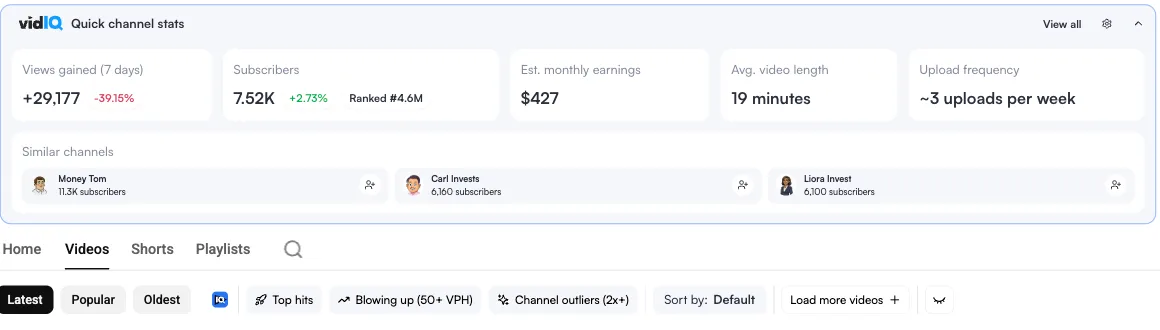
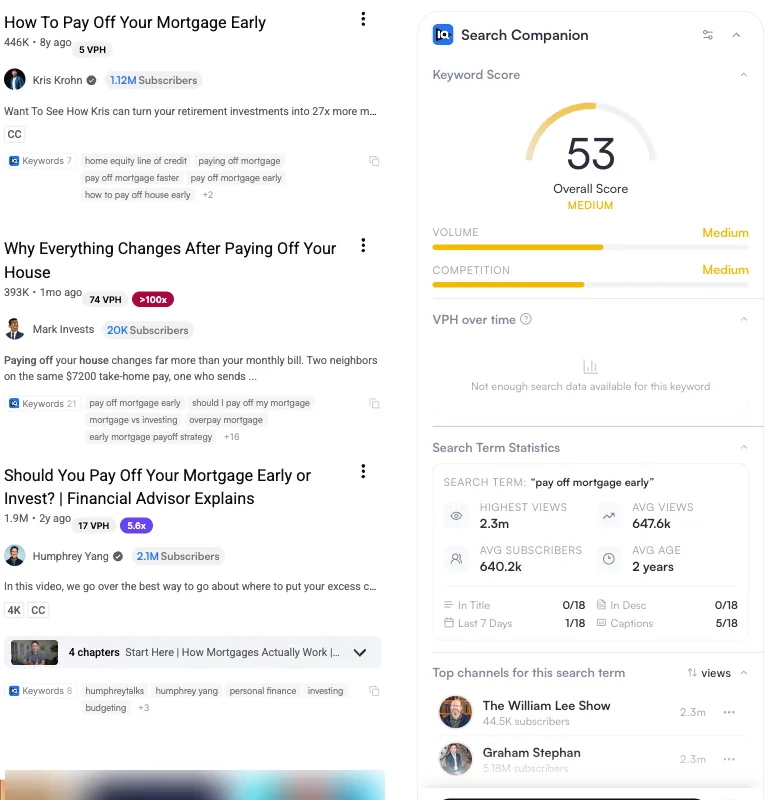
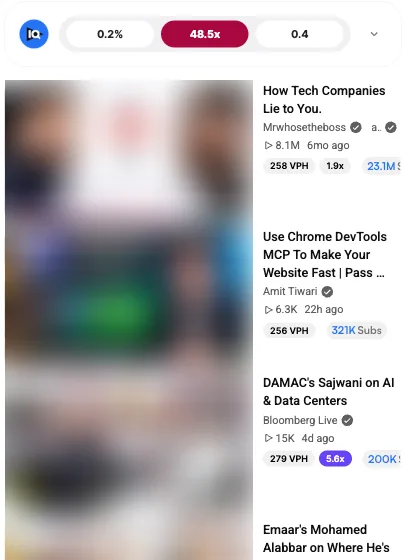
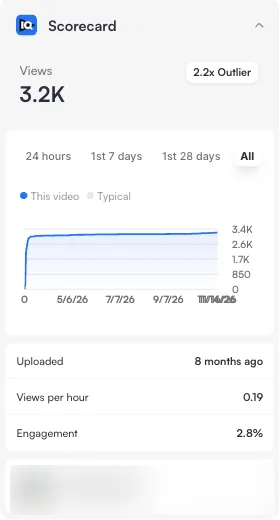
What I saw on 16 November: on the watch page, vidIQ adds three score pills at the top of the sidebar and puts views per hour and a multiplier under every related video. On the channel page it opens a "Quick channel stats" box with views gained in 7 days, subscribers, an estimated monthly earnings figure, average video length, upload frequency and three similar channels, plus filter chips for top hits, videos "blowing up" at 50+ views per hour and channel outliers at 2x or more. On search it shows a "Search Companion" with a keyword score, volume and competition, and keyword chips under each result. On the Short it showed a scorecard with views, an outlier multiplier, views per hour and engagement.
What I like: it is the most installed and best rated of the five by a wide margin, 4,000,000 users and 4.8 stars from 11,500 ratings. The views per hour and vidIQ Score on any video give a quick read, and its Studio tools help with titles and thumbnail ideas.
What I miss: its listing does not describe tools for the home or search feed, which is where I look for ideas. Its strongest features sit on paid plans that run on a monthly credit pool, which I compare in vidIQ vs TubeMind.
What I like and miss in TubeBuddy

What I saw on 16 November: on the watch page, TubeBuddy adds a "Videolytics" box that starts closed, with a Show Now button. Opened, it shows views, comments and likes, an SEO score, a best practices checklist (thumbnail, end screen, cards, chapters, captions), channel totals and the video's tags with a copy button. On search it shows a "Search Explorer" with a keyword score, related searches and common video tags. On the channel page and on the Short it added only a "Niche Insights" link to YouTube's left menu, and nothing on the page itself.
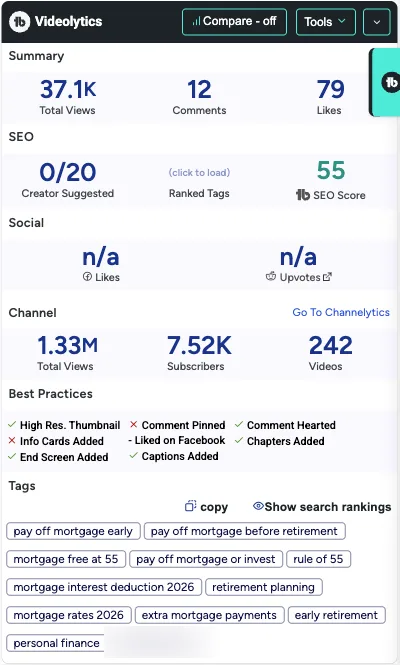
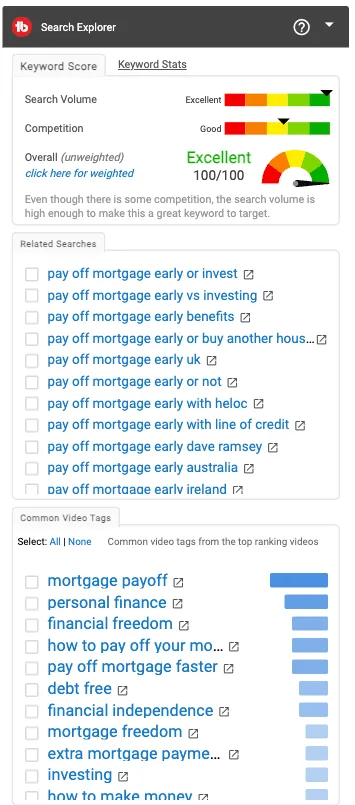
What I like: it is the only one of the five built around managing your own channel in YouTube Studio: bulk edits, card and end screen templates, and A/B tests for titles and thumbnails. If you have hundreds of old videos, that saves real hours.
What I miss: it is the heaviest extension here at 41.61 MiB, and its 3.5 rating is the lowest of the five. Its listing does not describe research tools on the home or search feed. My TubeBuddy vs vidIQ guide compares the two classic tools in full.
What I like and miss in NexLev

What I saw on 16 November, on the free version: on the watch page, a sidebar card with the video's outlier multiplier, views per hour, engagement, an RPM figure and estimated earnings, plus an RPM pill beside Subscribe, thumbnail, script and screenshot buttons in the player, and Analyze Comments with filters above the comments. It also adds a Connect MCP button to YouTube's top bar. On the channel page it showed a "Monetized" label, a Channel Tools menu, a Quick Channel Analytics bar marked beta (it did not open for me), and new tabs for Similar Channels, Analytics and Niche Overview. On search, every result got views per hour, a multiplier and a subscriber badge. On the Short, a small card showed the channel and its subscribers.
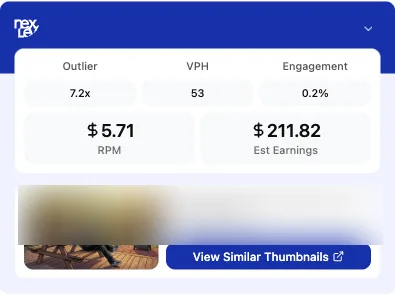

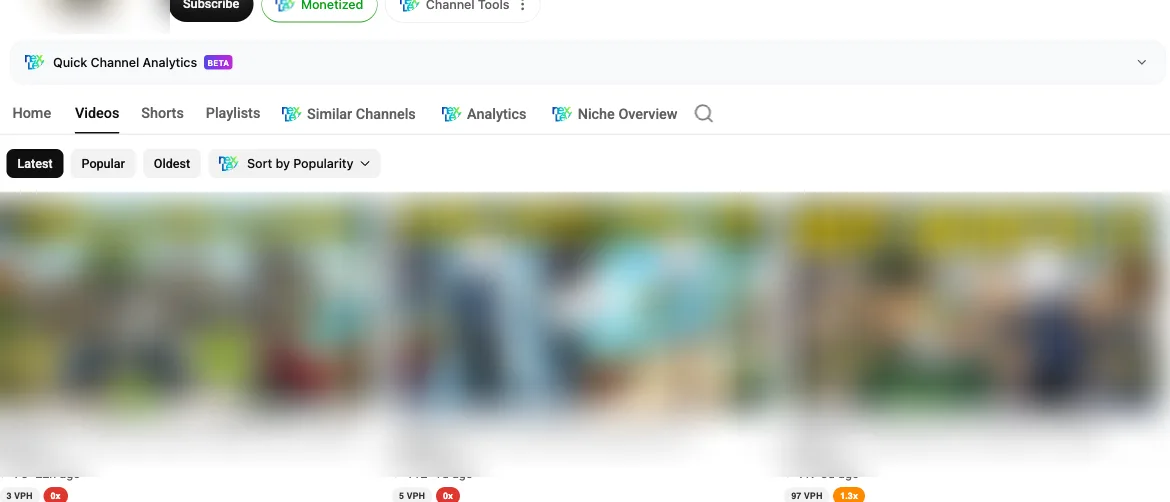
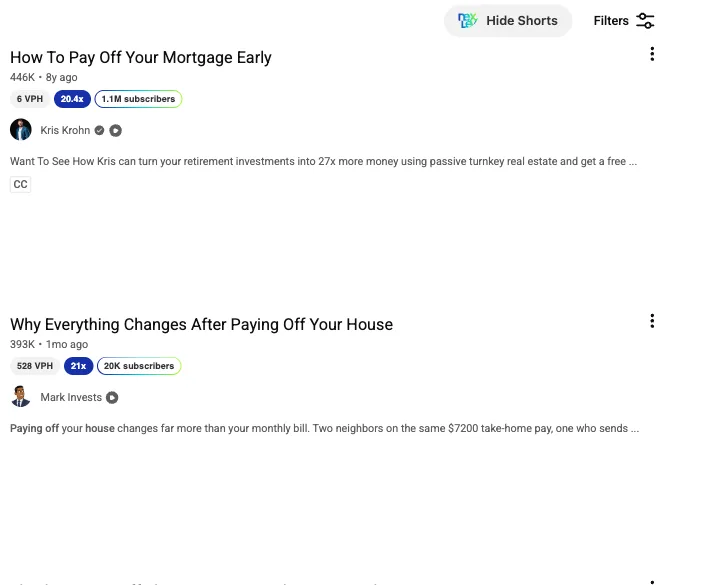
What I like: it has the widest research feature list on YouTube's own pages: feed filters by subscribers and date, a Shorts feed overlay with views per hour and channel age, similar channels on any channel page, transcripts and comment analysis. It is small (3.24 MiB) and was updated on the day I checked.
What I miss: most of the depth sits behind the pro plan, and its store listing still describes version 1.8.2 updates while the installed version is 3.13.3, so the description is behind the product. Its privacy section also declares location and web history, more categories than the other research tools. More in NexLev vs TubeMind.
What I like and miss in TubeLab's extension

What I saw on 16 November: TubeLab adds one pill beside the Subscribe button. On the watch page it showed a dollar sign and an estimated amount; on the channel page it showed a "Monetized" label with a question mark icon. Clicking the pill on the watch page opened nothing more in my test. On the Short I opened it showed nothing, and I did not check search, which its listing does not mention.


What I like: it does one thing and stays out of the way. It is under 1 MiB, adds an RPM and revenue estimate to channels and videos, and breaks down how a channel earns (ads, sponsors, affiliates, courses). Its store page declares that it does not collect or use your data.
What I miss: its last update was 25 June 2026, the oldest of the five. And its headline feature, an icon saying whether a channel or video is monetized, is an inference: YouTube does not publish Partner Program membership, so treat that icon as an estimate. It does not help on the feed or search, where most research starts. See TubeLab vs TubeMind for the full products.
TubeMind's extension: what it does, what is free, and what comes next
TubeMind is the tool I build, so this section goes further than the others. Below is what the extension does today, what you get without paying, what it cannot do yet, and what we are building next. I have kept it to what is in the extension's code and in our own build plan.

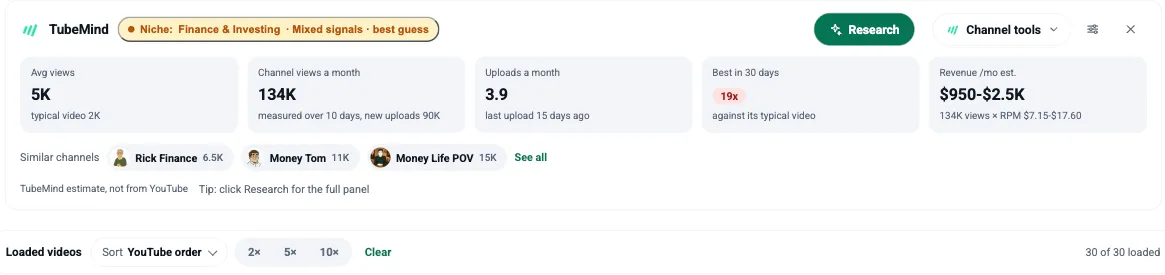
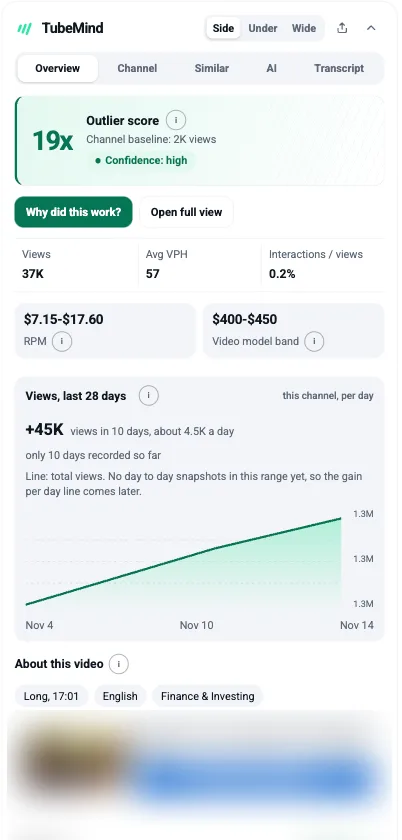
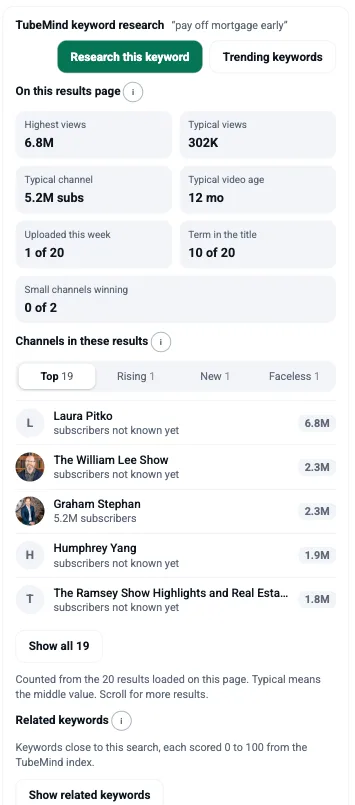
What I saw on 16 November: under the video, a bar shows the multiplier against the channel's usual views, a confidence label, the video's rank among the channel's recent uploads, average views per hour, a niche chip and a "Why did this work?" button. The side card adds the channel baseline, an RPM range, a video earnings band and a 28 day views graph. On the channel page a card shows average views, monthly channel views, uploads a month, the best video of the last 30 days, a revenue range and similar channels, with 2x, 5x and 10x filters for loaded videos. On search it adds feed filters (format, outliers, channel size, date, hide watched, hide Shorts) and a keyword research card. On the Short, the card showed the multiplier, but in 1.6.14 its layout was cramped, so I left that screenshot out. A fix is on its way to the store.


What you get on a free account
The extension is free to install and works with a free TubeMind account, which needs only an email. My screenshots were taken on my own account, so here is what changes on a free one, read from the extension's server code.
| Feature | Where it shows | Free account |
|---|---|---|
| Multiplier against the channel's usual views, views per hour, confidence and niche verdict | The bar under every video | Yes |
| Channel baseline, RPM range, video earnings band and a 28 day views graph | The side card on the watch page, in three sizes (Side, Under, Wide) | Yes |
| Average views, uploads a month and best video of the last 30 days | The channel page card | Yes |
| Similar channels and similar videos | The channel card and channel tabs | The closest few on free; the full lists on paid plans |
| Outlier and subscriber badges, and filters by format, multiplier, channel size and date | Home, search, subscriptions and channel pages | Yes |
| Keyword research card: typical views, typical channel size, uploads this week, channels in the results | Beside search results | Yes |
| Transcript reader, with copy with or without timestamps | The action row under the video | Yes |
| Saved ideas with your own brief, search, CSV export and JSON backup | The extension's Saved ideas page | Yes, stored in your browser |
| AI answers, such as "Why did this work?" and comment or transcript summaries | The card and the AI tab | A daily allowance; paid passes raise it, or add your own OpenAI, Gemini or Claude key |
The last column is the one that matters for your budget. The research on the page, the badges, the filters and your saved ideas cost nothing, and they come from our index of channels we already hold. What paid plans add is the part that costs us money to run: AI beyond the daily allowance, the full similar lists, and live YouTube lookups, so a channel we do not hold yet is looked up at once (on free it joins the queue and appears after our next crawl), plus manual refresh and in-depth search. The current plans are on the pricing page. The full feature guide is in the extension docs.
What it does not do yet
- No YouTube Studio tools: no bulk edits, no A/B tests and no tag editing. For tests, YouTube's own Test and Compare is free.
- No keyword search volume. The keyword card describes the results page you are looking at; for wider keyword data, the free keyword research tool on the site goes further.
- On a Short, the compact card is cramped in version 1.6.14. The fix is done and ships with the next store build.
- It runs on Chrome, Edge, Brave and Arc. Firefox and Safari are not supported.
- It is new on the store, with 1,000 users and 3 ratings, so it has no long track record yet.
What we are building next
These come from the build plan we are working through now. I am not giving dates, because each one ships only when it works on a live YouTube page and passes the same checks as the rest of the product.
- A "Will this work?" check before you commit to a niche: the risk, the likely pay range and how crowded it is, each with its evidence and never a yes or no verdict.
- A one click Research Run: the full study of a channel or a niche, started from the page you are on.
- One click hand-off of your research to ChatGPT or Claude, with the numbers attached, once we have checked it against YouTube's API terms.
- Recent views per hour and view charts built from repeated readings, so you can see a video speeding up as well as its lifetime average.
- Similar thumbnails and image search across our index.
- A thumbnail maker and "make my version" tools inside a project, so an idea goes from the page you found it on to a plan you can film.
My aim is for the free plan to keep the research itself, and for paid plans to pay for the parts that cost us money to run, like AI and live lookups.
Free tools on the site that go with the extension
The extension shows research on the page you are already on. When you want to search wider, the same data is in these free tools on tubemind.io.
| Job | Free tool |
|---|---|
| Find videos that beat their channel's usual views | Outlier finder and Shorts outlier finder |
| Check a niche before you start | Niche checker and faceless niche finder |
| Get video ideas from breakouts | Video ideas generator |
| Find channels like one you study | Similar channels |
| Score a title before you publish | Title analyzer |
| See where a video ranks in search | Rank checker |
| Estimate earnings and RPM | Money calculator and RPM by niche |
| Get a transcript or a thumbnail | Transcript tool and thumbnail downloader |
Each row is one job you might do after spotting something in the extension. For example, if the bar shows a 19x video, open the outlier finder for its niche to see whether it is a one-off or a pattern. To read the numbers well, start with what an outlier score means and how our scores work, then use YouTube video ideas by niche and YouTube Shorts ideas for where those numbers lead.
What I like and what I miss
What I like: it brings research to the page you are on, keeps the research itself free, reads only the public page and requests no access to your YouTube account. The whole extension is 172 KiB, and it shows a public size signal only, never a claim about whether a channel is monetized.
What I miss: Studio tools and keyword volume, for now. If optimizing your own uploads is your main job today, one of the classic tools still does that better, and TubeMind works alongside it.
Which extension fits which creator
This table is about the extensions only. For the full NexLev and vidIQ platforms (Niche Finder, AI credits, plans and prices), see NexLev vs vidIQ.
| Your main job | Best fit | Why |
|---|---|---|
| Finding video ideas while you browse YouTube | NexLev or TubeMind | Both add outlier signals and filters to the feed and search |
| Studying Shorts channels as you scroll | NexLev | Its guide describes a Shorts feed overlay with views per hour and channel age |
| Keyword scores and an AI coach | vidIQ | Its listing centres on vidIQ Score, tags and AI tools |
| Managing your own uploads in YouTube Studio | TubeBuddy | Bulk edits, templates and A/B tests |
| A quick earnings estimate on any channel | TubeLab | One narrow job, small extension |
| Research without any account access, on a free plan | TubeMind | Reads only the public page and requests no YouTube account access |
A common setup is one research extension and one optimization extension. If you install two, open Chrome's extension settings and turn off the surfaces you do not use, so YouTube stays readable.
Switching from the old TubeMind extension
If you installed an earlier TubeMind extension, switch in this order so you keep your saved ideas:
- In the old extension, open Saved ideas and click Export backup. It saves a JSON file.
- Go to chrome://extensions and remove the old TubeMind extension. Removing it deletes what it stored in your browser, which is why the backup comes first.
- Install the new version from the TubeMind Chrome Web Store listing.
- Click the extension icon, choose Connect TubeMind, and turn research on.
- Open Saved ideas and click Import backup to load the file.
The extension page shows what appears on each YouTube page once it is installed.
Limits of this comparison
- Features come from each Chrome Web Store listing, NexLev's own extension guide, and one read only pass per extension on 16 November 2026 with one test video, channel, Short and search. I did not open paid features, start trials or measure speed.
- "Not stated" in the surface table means the listing and guide do not mention it. An extension may still do more than its listing says.
- User counts and ratings change every week, and Chrome rounds user counts.
- TubeMind is my own product. I have kept its section to what its code and listing show, including what it lacks.
Sources and method
Chrome Web Store listings and their privacy sections, read on 16 November 2026: vidIQ, TubeBuddy, NexLev, TubeLab and TubeMind. NexLev features by page and its prices: Nexlev Chrome Extension Guide, same day. TubeMind details: the extension's manifest and store listing for version 1.6.14. Screenshots: taken by me on 16 November 2026 with one extension switched on at a time, then cropped and blurred.
See what research looks like on the page you are watching: get the free TubeMind extension.
Research right on YouTube: the free TubeMind Chrome extension shows the outlier multiplier, a revenue estimate and similar channels on YouTube pages.
Frequently asked questions
What is the best YouTube Chrome extension for research?
It depends on the job. For finding videos and channels that beat their usual views while you browse, NexLev and TubeMind are built around that. For keyword scores and an AI coach, vidIQ. For tools inside YouTube Studio, such as bulk edits and A/B tests, TubeBuddy. For a quick earnings estimate on any channel, TubeLab's extension is the narrowest and simplest.
Can I run several YouTube extensions at the same time?
Yes. Chrome lets you install all five side by side, and each one adds its own badges, panels or buttons to YouTube pages. The page gets crowded quickly, and each extension reads the page you open, so most creators keep one or two and turn the rest off in Chrome's extension settings.
Do these extensions need access to my YouTube account?
Not to work in the browser. The extensions read the public YouTube page you open. Some offer an account connection for extra features, such as tools for your own channel in YouTube Studio, and that connection is a separate Google permission screen. TubeMind's extension asks for no YouTube account access at all.
Can a Chrome extension increase my YouTube earnings?
Not directly. No legitimate extension changes what YouTube pays per view, and any tool that promises fake views or ad income breaks YouTube’s rules. Research extensions help in a slower way: they show which topics and titles beat a channel’s usual views, so you pick videos with a better chance of more watch time, and watch time is what earns.
Can an extension tell me if a channel is monetized?
YouTube does not publish which channels are in the Partner Program, so any badge that says a channel is monetized is the extension's own inference. NexLev's store listing calls its monetization checks estimates. TubeMind shows only a public size signal, whether a channel has passed 1,000 subscribers and 100,000 views, and never a monetization status. To check one channel without installing anything, use the free YouTube Partner Program checker.
How do I switch from the old TubeMind extension to the new one?
Back up your saved ideas first (Saved ideas, Export backup), because removing an extension deletes what it stored in your browser. Then open chrome://extensions, remove the old TubeMind extension, install the new one from the Chrome Web Store, connect your TubeMind account again and use Import backup.